
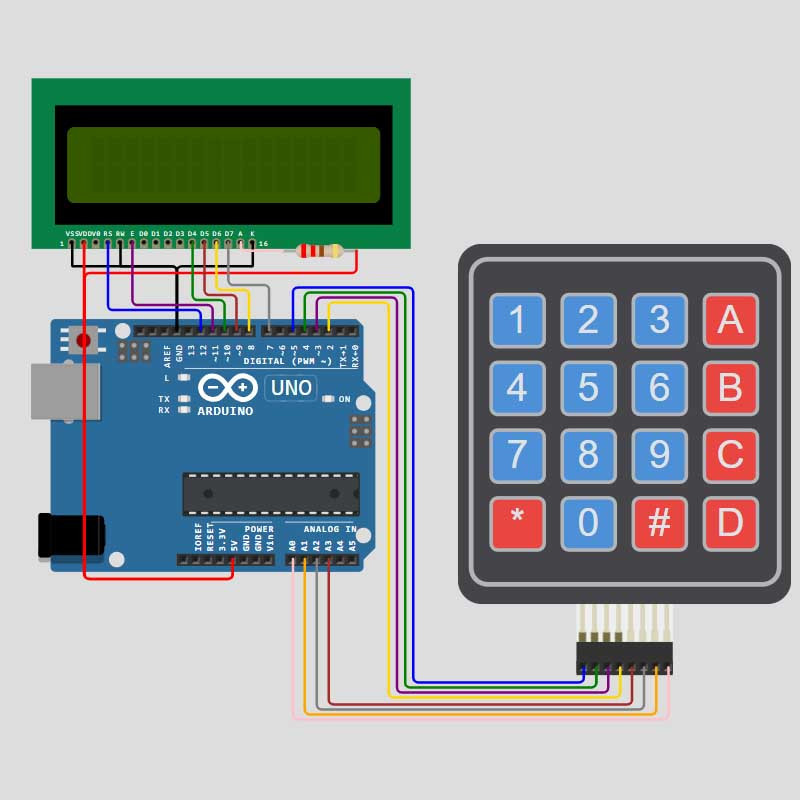

Learn how to build a fully functional Arduino-based electronic calculator with an LCD display and a 4x4 keypad. Download the complete source code, circuit schematics, and wiring guides directly for your DIY electronics projects.

In this comprehensive project tutorial, you will learn step-by-step how to design, wire, and program an electronic calculator powered by an Arduino board. Whether you are using an Arduino Uno, Nano, or Mega, this guide covers everything from hardware assembly to line-by-line firmware explanation.
.ino).Looking for more embedded systems and automation circuits? Browse our site library for a wide selection of ready-to-use Arduino, microcontroller, and DIY electronics projects.
🎬 Watch the Full Tutorial: See the circuit in action and follow the step-by-step build on YouTube: Watch Video Here
Learn how to build a fully functional Arduino-based electronic calculator with an LCD display and a 4x4 keypad. Download the complete source code, circuit schematics, and wiring guides directly for your DIY electronics projects.