- New
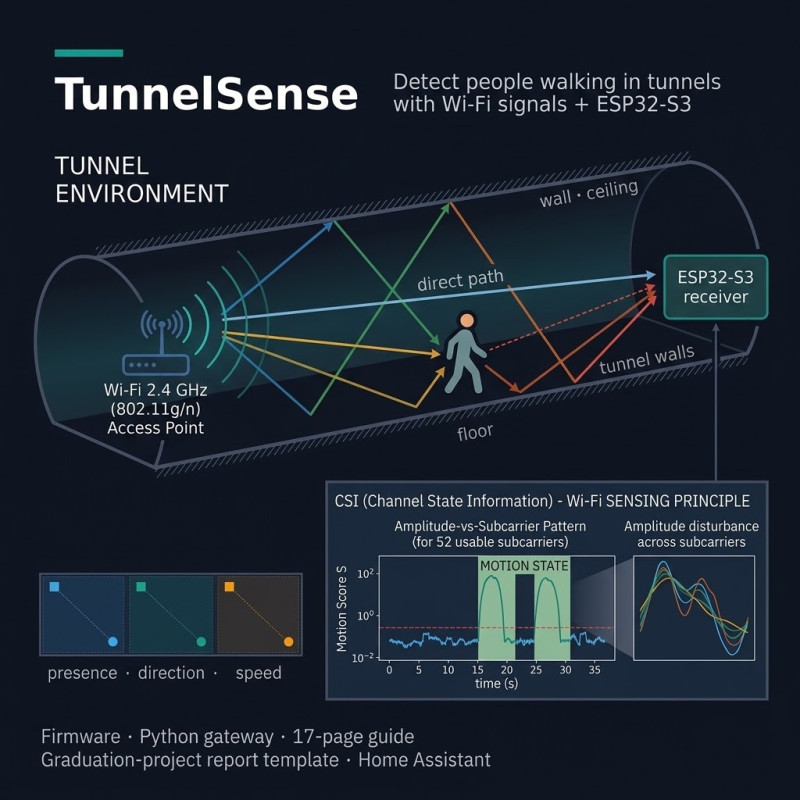


Wi-Fi CSI motion, direction and speed detection for tunnels on ESP32-S3. No cameras, works in darkness. Includes firmware, Python gateway, simulator with 16 automated tests, Home Assistant integration, a 17-page guide and a graduation report template.

TunnelSense: Detect People Walking in Tunnels with Wi-Fi Signals
Presence, walking direction and speed from low-cost ESP32-S3 nodes. No cameras, no microphones, and it works in total darkness.
TunnelSense is a complete prototype kit: firmware, gateway software, a 17-page guide and a graduation report template.
WHAT IS TUNNELSENSE?
Tunnels are hard places for cameras and motion sensors. Darkness, dust, humidity and long cable runs get in the way.
TunnelSense uses Wi-Fi radio signals instead. A person walking through a tunnel disturbs the reflections of a Wi-Fi link. An ESP32-S3 measures that disturbance as Channel State Information (CSI), and a lightweight algorithm turns it into a motion decision.
Place one node per tunnel segment. The order and timing in which the segments trigger show which way a person is walking and how fast.
HOW IT WORKS
1. Each node pings its access point about 50 times per second. Every reply carries CSI.
2. The node measures how much the signal's spectral shape fluctuates and learns an empty-tunnel baseline automatically.
3. When the fluctuation rises above the learned threshold, the segment reports MOTION over MQTT.
4. The gateway watches the order of segments: A > B > C means inbound, C > B > A means outbound. It also estimates walking speed from the timing.
WHAT YOU GET
Documentation
- 17-page PDF guide: CSI sensing explained, the algorithm, hardware list, tunnel deployment design, step-by-step setup, tuning guide, a 7-experiment test protocol, troubleshooting, limitations and ideas for further development
- Graduation report template (.docx) with chapter structure and guidance
- Results log (.csv) and bill of materials (.csv)
Source code (fully commented)
- ESP32-S3 firmware (ESP-IDF 5.1+): Wi-Fi, traffic generator, CSI capture, motion detector with automatic calibration, MQTT publishing, remote recalibration, optional raw-CSI serial recording
- Portable C detector core, unit-tested against a Python reference
- Python gateway: multi-node fusion for presence, direction and speed, CSV event log, MQTT events
- Simulator and 16 automated tests, so you can try the whole chain without hardware
- Record and replay tools: capture real CSI, replay it on your PC and tune parameters with plots
- Home Assistant MQTT entities and an example automation
WHO IS IT FOR?
- Engineering students (electronics, communications, computer, control, mechatronics) who want a graduation project with real hardware, real signal processing and a measurable evaluation
- Makers and IoT developers who want to learn Wi-Fi sensing on the ESP32
- Engineers who need a quick proof of concept for camera-free presence and direction detection in corridors, underpasses and service tunnels
- Researchers who want an open, testable baseline
WHAT YOU NEED
- 2-3 x ESP32-S3 boards (one per segment)
- A 2.4 GHz Wi-Fi access point (one router is enough for a bench prototype; one access point per segment for a real deployment)
- A computer or Raspberry Pi to run the Mosquitto MQTT broker and the Python gateway
- ESP-IDF 5.1 or newer, and Python 3.9+
- Basic electronics and command-line skills (beginner to intermediate)
PLEASE READ: WHAT THIS IS AND IS NOT
- It is a working prototype and a documented reference design.
- It is NOT a certified safety system. Do not use it as the only means of detecting people where a missed detection could cause harm.
- Tunnels are complex radio environments. You must calibrate and test on site; the guide includes a test protocol for this.
- It detects motion, not identity, and it does not count people.
- Figures in the guide marked "simulated" come from a synthetic channel model run through the real detector code. Your own measurements are what make your project credible.
- This is an independent implementation inspired by the open-source ESPectre project (GPL-3.0). No ESPectre code is included.
FAQ
Do I need prior experience with Wi-Fi CSI?
No. The guide explains it from the beginning.
Can I use it as my graduation project?
Yes, as a foundation. You are expected to run your own experiments, add your own improvements and write your own report. The template and test protocol are there to help.
Can I try it before buying hardware?
Yes. The simulator and the replay tool run on any computer.
Does it work with other ESP32 chips?
ESP32-S3 is the supported target. ESP32, ESP32-S2 and ESP32-C3 use the same CSI structure and should work. ESP32-C6 and C5 are not supported in this release.
Wi-Fi CSI motion, direction and speed detection for tunnels on ESP32-S3. No cameras, works in darkness. Includes firmware, Python gateway, simulator with 16 automated tests, Home Assistant integration, a 17-page guide and a graduation report template.